
You are using an out of date browser. It may not display this or other websites correctly.
You should upgrade or use an alternative browser.
You should upgrade or use an alternative browser.
Syria UAP 2021- Apparent Instantaneous Acceleration
- Thread starter Mick West
- Start date
What are the timestamps of both screencaps? Maybe in the first snapshot the FLIR was in NAR, which may have magnified the object's appearance, wheras the second screen is not in narrow field but normal? Or different zoom levels 2x vs. 4x. If the target ranging is accurate the MQ-9 tracks a <5m object at 22nm distance from the sensor. In consideration of the poor footage quality and flickering it doesn't strike me as too unusual.Another key point is that what we see seems to be a kind of glare. Kind of unusual from a cold object, but did the object really change size? Both boxes are 5m wide.
View attachment 88370
Last edited:

TheCholla
Senior Member
Looking to that exchange on X, you're talking past each other with Marik. You're saying there is no variation in the rate of change for the MGRS coordinates, which is what he's also stating to hypothesize that the zipoff is from the object.This is what I was stating on X.
Because if zipoff is from the camera, we expect a change in the rate of change in MGRS values (the point that the Reddit post makes, that there is a jump in northing). For your debunk, you wanna say that there is a jump in the MGRS coordinates. The question is, is it during or after the zipoff?
@Mick West your example above is for different FOV (ULTN vs 4X), it doesn't shrink between these two segments. But to your point, the object does shrink at the end and I haven't seen a good explanation as of why. The camera mode doesn't change there. That's the bizarre part for me, more so than the zipoff that indeed happens exactly on the same frame as "RATE" (then RATE G).
Last edited:

@Mick West your example above is for different FOV (ULTN vs 4X), it doesn't shrink between these two segments.
Both boxes are essentially the same size, in that they describe 5m horizontally on the ground. At ULTN (Ultra narrow, the maximum optical zoom), we see a smaller object relative to the box.
If we take the 4x version and shrink it down 4x, we see the box encloses the same area, and the object has grown. Because that's not actually the shape of the object.
Marik seems to misunderstand this, saying the 5 meters is "to the ground", which I'm charitably assuming he means "on the ground", which is correct, but, since the ground hasn't really moved, irrelevant. And I'm not talking about distance. I'm really a bit bemused as to how he's misunderstanding this.
But to your point, the object does shrink at the end and I haven't seen a good explanation as of why.
Same reason the word "ACFT" shrinks, it's a localized change in gain that happened AFTER the actual recording.
So basically, in the camera of the person recording it off the screen. For unknown reasons, but maybe from recording off a CRT.
Which might mean the "cold glare" image expansion isn't that unusual. It's normal glare, from the bright (cold) white of the object. Same reason the TGT A is a bit blown out.
To expand on that:So basically, in the camera of the person recording it off the screen. For unknown reasons, but maybe from recording off a CRT.
You get dark regions when recording from a CRT (an older Cathode Ray Tube TV), because the picture is built up from top to bottom. So if your exposure is not a multiple of the frame time of the TV (like 1/60, 1/30) then you get something like 1.5 frames at full brightness.
I'm not sure this is what is happening here - as normally this would cause flickering, but clearly SOMETHING is making some regions of the screen darker, and that seems to be what is making the object smaller.
TheCholla
Senior Member
I see what you're saying. But that dip in brightness happens at other times without that much change in the object. Still super bright here for example. So I guess you're saying it's a broader region being affected at the end, but this is hard to tell.Same reason the word "ACFT" shrinks, it's a localized change in gain that happened AFTER the actual recording.
It happens in other places, that one's just the greatest.But that dip in brightness happens at other times without that much change in the object.

Dave51c
Senior Member
If it is a recording from a CRT is it possible the recording camera shutter (even if at the correct exposure time) is not sync locked to the CRT scan so as to cause a phasing effect? i.e. shutter speed drift/CRT line scan drift. Also, CRT's have some inherent brightness persistence ~1ms to 6ms typically.I'm not sure this is what is happening here - as normally this would cause flickering, but clearly SOMETHING is making some regions of the screen darker, and that seems to be what is making the object smaller.
Well, this is annoying. I've only just noticed that the version I was working on is actually a cropped and degraded version. The YouTube video starts out with 1m24s of the object first flying (apparent) left (west), and then right (east). It's rock solid, which should have been suspocious for someting filmed off a screen. It looks like

Then there's a slowed 2x version, which looks like:

It has much clearer text, and you can now see the FVH and C/S (Course/Speed). This version is less stabilized, and moves around, mostly vertically. However, it's only a short clip.
It's also rather different in the "fly off" section.
So, ideally, Corbell would release the full, unedited footage.
Then there's a slowed 2x version, which looks like:
It has much clearer text, and you can now see the FVH and C/S (Course/Speed). This version is less stabilized, and moves around, mostly vertically. However, it's only a short clip.
It's also rather different in the "fly off" section.
So, ideally, Corbell would release the full, unedited footage.
Using the slightly better quality version here, I converted it to real-time 30fps (29.97)
The question that the promoters like Marik are holding out on is if the panning continues during the "fly-off". It's a little hard to see with all the noise, so I added a blur sufficient that the pixel noise is no longer a factor, but we can still see the large-scale background motion (Gaussian blur level 50 in Final Cut Pro)

If we scrub over this footage, we see the panning stops the instant the object starts its apparent movement. Also the same moment it transitions to RATE G.
Here's both combined. The movement is still apparent in the original.
So it really looks like it simply stopped tracking at that instant, and that's what made the object look like it flew off-screen.
I think the objection to this will be that the MSGR (east and North) numbers in the bottom-right keep changing, as if it were still panning East. This appears true, during the fly-off, the easting goes from 12166 to 12197 (31m) over 15 frames of the above. About 2m/frame. However, at the start of that clip, we see the numbers increase from 11639 to 11703 (64 m) over the first 15 frames, slightly more than twice as fast, around 4m/frame. So with that panning difference, we'd expect to see the object move right at 4-2 = 2m/frame. Given the FVW (Field of View, Width) is 58m, and it's about 2/3 of the way across (say 40m), we'd expect it zip off in about 40/2 = 20 frames. The zip-off happens from about frame 121 to 135, just 14 frames. But still in the ballpark.
However, the video itself is the ground truth here. Sadly, it's of the usual very low quality, which allows some ambiguity. There's also some uncertainty as to how the system actually works.
But, ultimately, the mundane explanation (a balloon) seems like it should be at the top of the list, as it does not require any new physics or advanced technology.
The question that the promoters like Marik are holding out on is if the panning continues during the "fly-off". It's a little hard to see with all the noise, so I added a blur sufficient that the pixel noise is no longer a factor, but we can still see the large-scale background motion (Gaussian blur level 50 in Final Cut Pro)
If we scrub over this footage, we see the panning stops the instant the object starts its apparent movement. Also the same moment it transitions to RATE G.
Here's both combined. The movement is still apparent in the original.
So it really looks like it simply stopped tracking at that instant, and that's what made the object look like it flew off-screen.
I think the objection to this will be that the MSGR (east and North) numbers in the bottom-right keep changing, as if it were still panning East. This appears true, during the fly-off, the easting goes from 12166 to 12197 (31m) over 15 frames of the above. About 2m/frame. However, at the start of that clip, we see the numbers increase from 11639 to 11703 (64 m) over the first 15 frames, slightly more than twice as fast, around 4m/frame. So with that panning difference, we'd expect to see the object move right at 4-2 = 2m/frame. Given the FVW (Field of View, Width) is 58m, and it's about 2/3 of the way across (say 40m), we'd expect it zip off in about 40/2 = 20 frames. The zip-off happens from about frame 121 to 135, just 14 frames. But still in the ballpark.
However, the video itself is the ground truth here. Sadly, it's of the usual very low quality, which allows some ambiguity. There's also some uncertainty as to how the system actually works.
But, ultimately, the mundane explanation (a balloon) seems like it should be at the top of the list, as it does not require any new physics or advanced technology.
It seems to lag at a very small amount sometimes, not the 15 frames of the fly-off.do you notice a lag between camera motion and the change in MGRS coordinates? Like one frame or so? Or it's instantaneous?
But where is the object when they zoom out again?
When it zips off, it seems to do this because the camera is no longer panning right. It zips off at a high apparent speed. In the video above I have adjusted the zoom levels so they are all the same scale. I circle the object, and when the video stops panning right, I track it to the edge, and then continue.
When they zoom out to 2x and start to pan right, I greatly slow down the apparent motion. The camera is panning right, but not as fast as before, so it's not keeping up.
Then, when they zoom all the way out to ULTN (1x zoom), the object is entirely off-screen.
I doubt that's 100% accurate, but it's in the ballpark. Even if it were slightly on screen at ULTN, it would only be there for a few frames, and likely lost in the noise. But I think it is actually well off the right at that point.
When it zips off, it seems to do this because the camera is no longer panning right. It zips off at a high apparent speed. In the video above I have adjusted the zoom levels so they are all the same scale. I circle the object, and when the video stops panning right, I track it to the edge, and then continue.
When they zoom out to 2x and start to pan right, I greatly slow down the apparent motion. The camera is panning right, but not as fast as before, so it's not keeping up.
Then, when they zoom all the way out to ULTN (1x zoom), the object is entirely off-screen.
I doubt that's 100% accurate, but it's in the ballpark. Even if it were slightly on screen at ULTN, it would only be there for a few frames, and likely lost in the noise. But I think it is actually well off the right at that point.

FatPhil
Senior Member.
You know this, I know this, but clearly not everyone in the world knows this: If there's a discontinuity between the ratio of the size at a distance to the nearground object, and the size at the distance to the background, and you're tracking an object on a continuous path, then the plane capturing the images must have travelled in a discontinuous path. Congratulations, Marek, you've just added space-warping planes to the menu. I bet the pilot didn't even know he was on one of those. Gotta love the "looks really bad" part of his post, false confidence is hilarious.Marik seems to misunderstand this, saying the 5 meters is "to the ground", which I'm charitably assuming he means "on the ground", which is correct, but, since the ground hasn't really moved, irrelevant. And I'm not talking about distance. I'm really a bit bemused as to how he's misunderstanding this.
How accurate is the MGRS data? It's being calculated from the position of the drone angle of the camera down to a point on a 3D model of the ground over 20 miles away, so in that sense it's amzing it gets anywhere near accurate. But do we have meter-level accuracy? Is it even the camera position?
Here are two shots within a few seconds of each other where the camera is pointing at the same spot on the ground.


The first is 37S CR 12486 93296
Second 37S CR 12460 93292 (or actually midway between 93304 and 93292, so I picked the closer one)
Rather different, 26m apart. And we can plot them on Google Earth.

Not only are they not the same as each other, but they also are not even in the correct position seen in the video.
Here are two shots within a few seconds of each other where the camera is pointing at the same spot on the ground.
The first is 37S CR 12486 93296
Second 37S CR 12460 93292 (or actually midway between 93304 and 93292, so I picked the closer one)
Rather different, 26m apart. And we can plot them on Google Earth.
Not only are they not the same as each other, but they also are not even in the correct position seen in the video.
TheCholla
Senior Member
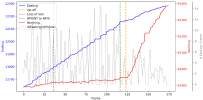
Here is a plot of "Easting" and "Northing" (MGRS values) versus frame number, using Mick's cleaner version from post #51, that starts a bit before the loss of lock.
Although the last two MGRS digits are easier to see in this version, they are sometimes hard to read. But I think this is generally accurate.
I'll update if values can get deciphered better and need to be slightly adjusted.

I've added the derivative of easting x(t+1)-x(t-1)/2dt, that's the dashed grey line. The purple and orange vertical dashed lines mark the loss of lock (frame #36), and the zip-off (frame #123), respectively. The dashed green line marks the camera mode switching from "RPOINT" to "RATE" at frame #116.
A few remarks but I leave it for interpretation.
There is a slight slowdown in the easting value before the zip-off, but it happens before without the same consequence (around frame 55, when lock is lost already). The northing value increases progressively and jumps after the zipoff.
To me it's unclear that there is a big camera jump happening before/during the zip-off, that is particularly different from what has happened before (one point to Marik). However the fact that RPOINT switches to RATE a few frames before the zip-off is problematic for the "instantaneous acceleration" theory because it seems too coincidental (one point to Mick). The fact that the operator does not look where we could verify if the object is still visible, after unzooming, is also problematic (maybe this needs to be confirmed, there is some uncertainty there).
In the end, even if both the background and MGRS values do not show a clear jump that is exactly coincidental with zipoff, I think the video is way too ambiguous to conclude on the object disappearing abruptly (instantaneous acceleration, or a bursting balloon, or wind gust). If there was a repetition of observations like this, that would be intriguing, but we don't know if that's the case.
EDIT to add a vertical line for when the camera mode goes from RATE to RATE G (frame #126).
I personally don't know if RATE and RATE G are different modes, or if there is only a "RATE G" mode, and it's just that the G displays with a bit of lag. Will be interested to know if someone finds out.
Although the last two MGRS digits are easier to see in this version, they are sometimes hard to read. But I think this is generally accurate.
I'll update if values can get deciphered better and need to be slightly adjusted.
I've added the derivative of easting x(t+1)-x(t-1)/2dt, that's the dashed grey line. The purple and orange vertical dashed lines mark the loss of lock (frame #36), and the zip-off (frame #123), respectively. The dashed green line marks the camera mode switching from "RPOINT" to "RATE" at frame #116.
A few remarks but I leave it for interpretation.
There is a slight slowdown in the easting value before the zip-off, but it happens before without the same consequence (around frame 55, when lock is lost already). The northing value increases progressively and jumps after the zipoff.
To me it's unclear that there is a big camera jump happening before/during the zip-off, that is particularly different from what has happened before (one point to Marik). However the fact that RPOINT switches to RATE a few frames before the zip-off is problematic for the "instantaneous acceleration" theory because it seems too coincidental (one point to Mick). The fact that the operator does not look where we could verify if the object is still visible, after unzooming, is also problematic (maybe this needs to be confirmed, there is some uncertainty there).
In the end, even if both the background and MGRS values do not show a clear jump that is exactly coincidental with zipoff, I think the video is way too ambiguous to conclude on the object disappearing abruptly (instantaneous acceleration, or a bursting balloon, or wind gust). If there was a repetition of observations like this, that would be intriguing, but we don't know if that's the case.
EDIT to add a vertical line for when the camera mode goes from RATE to RATE G (frame #126).
I personally don't know if RATE and RATE G are different modes, or if there is only a "RATE G" mode, and it's just that the G displays with a bit of lag. Will be interested to know if someone finds out.
Attachments
Last edited:
Sterling work!Here is a plot of "Easting" and "Northing" (MGRS values) versus frame number, using Mick's cleaner version from post #51, that starts a bit before the loss of lock.
Yesterday I did a bunch of work on Sitrec to make OSD (On Screen Display) number extraction easier. Duplicating/verifying your numbers
I also created a version of the video with the cleaner 50% speed version (which, it turned out, was actually 33.333% speed) spliced over the appropriate frames, and all converted to 29.97. I used that, and the new OSD tool, to extract a much higher resolution set of eastings and northings. I've then added code to Sitrec to convert this into a live target track (i.e., it will be updated automatically as you enter more numbers)
Using that with the drone track (not high resolution, but not so important), we can see what happens. The camera does continually increase the eastings, but because of the increase in northings, its angular velocity slows greatly.
It is quite clear, looking at the top-down view, you see the camera essentially orbiting a point where the LOS cross, and then at the zip-off instant it stops orbiting it, and the LOS move to the left of that point (meaning anything in that point would zip off to the right). Super high magnification makes it look more dramatic, as in previous cases.
Here's the combined video, which, unless Corbell releases the full unstabilized video, is the best reference version, and what I'll use to refer to frame numbers now.
https://sitrec.s3.us-west-2.amazonaws.com/1/Syria Combined Clip B 29.97-8b0bbf42b44a.mov
I'll make a short video explaining this. But there's still a bit more work to do on making the OSD tracks sharable. It's in here, but not saving the OSD track, so you need to go to OSD tracker, Make Track, then Target , Target Track -> OSD
https://www.metabunk.org/sitrec/?custom=https://sitrec.s3.us-west-2.amazonaws.com/99999999/Syria Demo/20260210_184827.js
Last edited:
This is the sitch I used in the video (with one point early on adjusted, no change to the zip-off portion)
https://www.metabunk.org/sitrec/?cu...yria with Flight Sim Track/20260211_093535.js
The drone track is a constant rate turn which matches the rather sparse GPS points almost exactly. I use it to smooth things out early on when there are not so many points.

There's a bit of a bug at the moment where the track isn't adjusted live when you adjust the OSD values. But I think that can wait.
https://www.metabunk.org/sitrec/?cu...yria with Flight Sim Track/20260211_093535.js
The drone track is a constant rate turn which matches the rather sparse GPS points almost exactly. I use it to smooth things out early on when there are not so many points.
There's a bit of a bug at the moment where the track isn't adjusted live when you adjust the OSD values. But I think that can wait.
FatPhil
Senior Member.
Here is a plot of "Easting" and "Northing" (MGRS values) versus frame number, using Mick's cleaner version from post #51, that starts a bit before the loss of lock.
This is good stuff, thanks. The data does look very noisy, do we know the source of that noise? In particular, the plateaus and jumps can't be real physical data. You mentioned possible lag - could it be that all of the numbers have potential lag in them? And, in the absense of a new value, old values are simply being repeated? If so, what happens if you drop those repeats and interpolate? Can you upload the raw data that you have? I don't mind trying out a few ideas. Plain text/CSV would probably be best, as my libreoffice is ancient and probably won't handle modern spreadsheets.
TheCholla
Senior Member
Sure here it is in attachment.Can you upload the raw data that you have? I don't mind trying out a few ideas. Plain text/CSV would probably be best, as my libreoffice is ancient and probably won't handle modern spreadsheets.
In particular, the plateaus and jumps can't be real physical data.
There are duplicate frames as well as frames with minimal changes, inducing these steps.
As mentioned by Mick earlier:
It's even had to say what is a "frame" here. We've got a 60fps video of something that looks like it was replaying at some point at 10 or 15 fps, and seems to be videoed off a screen, with the aforementioned weird contrast changes.
Attachments
TheCholla
Senior Member
@Mick West you didn't mention the fact that the object would be out of the FOV when the operator unzooms.
I think it's important because the object being gone would suggest something happened to it when it zips off (that was my initial impression before I realize it actually could be out of the FOV).
Proving that the ULTN section is not looking where it should is further confirmation that nothing special happened to it.
Why didn't you include your analysis about this? Omission or because it's uncertain?
I think it's important because the object being gone would suggest something happened to it when it zips off (that was my initial impression before I realize it actually could be out of the FOV).
Proving that the ULTN section is not looking where it should is further confirmation that nothing special happened to it.
Why didn't you include your analysis about this? Omission or because it's uncertain?
I just didn't think about it. I think maybe the next step is to get a simulation with an object in the right position, try to match the FOV, and see how it zips off. A bit fiddly with the noisy data. I coded all the OSD data extraction rather quickly, and there are a few issues I'd like to resolve, and I have other work to do, so it might be a while.Why didn't you include your analysis about this? Omission or because it's uncertain?
That said... One thing that's bugging me is getting the altitude of the drone right. Something I discussed in the video.
https://www.metabunk.org/sitrec/?cu...yria with Flight Sim Track/20260211_180507.js

I just realized I forgot to turn on my snazzy new MQ9UI for the video. This will be important for a full reconstruction.
The ACFT numbers say 17,041 HAT (Height Above Terrain). As you can see I just stuck it at 20,000ft MSL, which gives 17622 HAT, actually a bit high, but I figured maybe it was barometric. Either way, it's too low for the terrain model that I (and, it seems, Google Earth) use, and at the end, where they zoom out a bit and you can see the gravel point bar at the bend in the river, and one of those dark enclosures (maybe rock corrals?)

But as you can see above, you can't see the river from 20,000 feet.
In fact, to raise it up to see the river, you need to go to 28,000 feet. over 25,000 feet HAT, and then it still looks wrong.

Now I can accept that it might be normal distortion from imperfect elevation models, and that river beds can change a lot. But this is on the back slope of the valley, and that should make it more stretched vertically, not compressed. It makes me wonder if it's even the right place. The features seem to match
Then there's an earlier clip, where there's an object going the other way, and some buildings.

the middle of that:

ACFT: 32 03 20.8, 36 54 42.7. 17074 HAT
TGT: 37s CS 09996 05811

That does seem to resolve to an area with some impression of buildings, but there's no image from 2021.
Anyway, frustrating puzzles
https://www.metabunk.org/sitrec/?cu...yria with Flight Sim Track/20260211_180507.js
I just realized I forgot to turn on my snazzy new MQ9UI for the video. This will be important for a full reconstruction.
The ACFT numbers say 17,041 HAT (Height Above Terrain). As you can see I just stuck it at 20,000ft MSL, which gives 17622 HAT, actually a bit high, but I figured maybe it was barometric. Either way, it's too low for the terrain model that I (and, it seems, Google Earth) use, and at the end, where they zoom out a bit and you can see the gravel point bar at the bend in the river, and one of those dark enclosures (maybe rock corrals?)
But as you can see above, you can't see the river from 20,000 feet.
In fact, to raise it up to see the river, you need to go to 28,000 feet. over 25,000 feet HAT, and then it still looks wrong.
Now I can accept that it might be normal distortion from imperfect elevation models, and that river beds can change a lot. But this is on the back slope of the valley, and that should make it more stretched vertically, not compressed. It makes me wonder if it's even the right place. The features seem to match
Then there's an earlier clip, where there's an object going the other way, and some buildings.
the middle of that:
ACFT: 32 03 20.8, 36 54 42.7. 17074 HAT
TGT: 37s CS 09996 05811
That does seem to resolve to an area with some impression of buildings, but there's no image from 2021.
Anyway, frustrating puzzles
One last puzzle. Here's the first frame of the zip-off

It looks like there's no motion in the background. Is this the object moving before the camera moves?
No. Notice that not only is the background not moving, but none of the lower numbers change either. Yet in previous and subsequent frames, they do change.
Single step through it here, you'll see the number change on on all the other frames.
I think this is an artifact of recording off a CRT. The top half of the screen is showing two individual frames one at a time, but the bottom half is showing both frames combined. Notice how the last digits of the lat/long (in the top half of the screen) are clear (if rather dark), but the non-changing MGRS in the lower half are indecipherable. This is because it's two or more frames blended together.
You'll notice that not only do the numbers not change, then entire bottom half the the screen is essentially frozen.
So we have different parts of the screen being composed of different numbers of frames. And this explains when the object seems to move when the background is static.
It would be interesting to find out the chain of recording, re-recording, and re-encoding this video has gone through to get in this state.
The only thing I can think of is that they used some kind of surveillance video camera designed for low light, and it does frame combining over regions to boost an image. Since it's not designed for a moving background, it gets it wrong.
Tricky to explain to the ardent. But you can see that it happens, if not exactly why.
It looks like there's no motion in the background. Is this the object moving before the camera moves?
No. Notice that not only is the background not moving, but none of the lower numbers change either. Yet in previous and subsequent frames, they do change.
Single step through it here, you'll see the number change on on all the other frames.
I think this is an artifact of recording off a CRT. The top half of the screen is showing two individual frames one at a time, but the bottom half is showing both frames combined. Notice how the last digits of the lat/long (in the top half of the screen) are clear (if rather dark), but the non-changing MGRS in the lower half are indecipherable. This is because it's two or more frames blended together.
You'll notice that not only do the numbers not change, then entire bottom half the the screen is essentially frozen.
So we have different parts of the screen being composed of different numbers of frames. And this explains when the object seems to move when the background is static.
It would be interesting to find out the chain of recording, re-recording, and re-encoding this video has gone through to get in this state.
The only thing I can think of is that they used some kind of surveillance video camera designed for low light, and it does frame combining over regions to boost an image. Since it's not designed for a moving background, it gets it wrong.
Tricky to explain to the ardent. But you can see that it happens, if not exactly why.
I have figured it out! It was NOT the right place, this is.Now I can accept that it might be normal distortion from imperfect elevation models, and that river beds can change a lot. But this is on the back slope of the valley, and that should make it more stretched vertically, not compressed. It makes me wonder if it's even the right place. The features seem to match
The UI is using a fixed elevation of 1725 feet instead of a DEM (digital elevation model). So the target ground track is at 1725 feet, which is actually underground. And the altitude of the drone is 1725 + 17041 = 18,766 ft, MSL
I added a MSL altitude lock to OSD tracks, and now it looks much better. Funny that it ended up in a pl
Still need to code in the FOV changes.
Last edited:
Fixed!Still need to code in the FOV changes.
Source: https://www.youtube.com/watch?v=sQAIVXGsgnI
Early track isn't perfect, but it all looks a lot better than before. I added a HD overlay from Apple Maps at the end.

NorCal Dave
Senior Member.
I think this is an artifact of recording off a CRT. The top half of the screen is showing two individual frames one at a time, but the bottom half is showing both frames combined. Notice how the last digits of the lat/long (in the top half of the screen) are clear (if rather dark), but the non-changing MGRS in the lower half are indecipherable. This is because it's two or more frames blended together.
So, going back to post #46, why do we not see the classic raster lines that result from recording a CRT? Were they using various frame rates on the recording device until the usual raster lines resolved or got replaced by these faint echos of them? Backing my '80s video days, the trick was to synch the recording device with the display to eliminate the raster lines, assuming one had the ability to do so.
I don't think syncing the frame rate eliminates raster lines, unless you mean interlacing.So, going back to post #46, why do we not see the classic raster lines that result from recording a CRT? Were they using various frame rates on the recording device until the usual raster lines resolved or got replaced by these faint echos of them? Backing my '80s video days, the trick was to synch the recording device with the display to eliminate the raster lines, assuming one had the ability to do so.
I'm not really sure about CRTs, it might be some other display technology that has a similar result. What's clear is that on some frames, part or all of the frame is doubled.
NorCal Dave
Senior Member.
I don't think syncing the frame rate eliminates raster lines, unless you mean interlacing.
Yes, sorry old slang I guess I miss-remembered from 40 years ago. Scan lines, interlace lines, raster lines or whatever to describe the line that would crawl down the screen when one used an analog video or film camera to film an analog CRT screen. I used to operate an old Ikagami ITC730 and I have a vague memory of a set up where we had to film a person watching a TV, so my boss had an engineer from the local TV station come over and sync the camera and the playback going to the TV:
https://www.smecc.org/ikegami.htmExternal Quote:
System Connection Features
· A built-in genlock feature (standard) makes external sync (VBS/BBS signals) operation possible by a coaxial cable.
https://www.tvtechnology.com/miscellaneous/analog-video-synchronizationExternal Quote:
The process of combining video signals originating from different local sources requires perfect synchronism and relative timing of all the signals present at the input of a production switcher. The synchronization is obtained by locking all video signal sources to a common reference black burst signal generated by the master sync generator. Modern equipment provides adjustments to meet the specs.
From Gemini AI:
More importantly for more modern situations, I did find this guy talking about basically doubling the frames and overlying the double frames a bit off to create a crude comb filter that removes the scan lines when recording or using old CRT images:External Quote:
Recording CRT screens with old analog cameras involved matching the camera's frame rate and shutter speed to the television's scanning rate (typically 60Hz/29.97fps in NTSC or 50Hz/25fps in PAL) to avoid flickering or rolling scan lines.
https://creativecow.net/forums/thread/remove-scan-lines-from-a-filmed-crt/External Quote:
I did something like that ages ago. If you're stuck with that footage, here's what you can try. Double the video layer. Now offset the bottom layer down by one scan line, if possible. You can try making the top layer transparent, or compositing as an add or a screen. Here's an example:
This is actually a photo with simulated scan lines… I don't have any analog televisions hooked up these days. So here's a snap-shot from Vegas, with the two layers offset, using 50% transparency on the top layer:
And here's the two set up as a composite set, in "screen" mode:
You could probably do a better job lining things up.. this was a quickie just to demonstrate the technique. And of course, if you have more than just the screen in your shot, you may have to use mask out the TV and do this in a few separate layers.
This is actually a crude attempt at building a simple comb filter, which is what modern televisions, particular digital televisions, do to de-interlace, remove scan lines, and filter out chroma, all in one operation.
Unfortunately, what ever photos accompanied the above trick are no longer available.
I guess it also seems unlikely someone using a camera or phone to make a supposedly clandestine recording of a mysterious UFO on a CRT would go through the trouble. But possibly later in the chain of custody from the original to Corbel somebody fooled around trying to remove the scan/interlace lines?
TheCholla
Senior Member
Fixed!
Source: https://www.youtube.com/watch?v=sQAIVXGsgnI
Early track isn't perfect, but it all looks a lot better than before. I added a HD overlay from Apple Maps at the end.
Would you have the link to the Sitrec stitch with the correct elevation/terrain?
Sorry, yes, posted that before dinner time.Would you have the link to the Sitrec stitch with the correct elevation/terrain?
https://www.metabunk.org/sitrec/?cu...yria with Flight Sim Track/20260212_192030.js
There's some oddness going on with the framerate and the different versions. The one that @TheCholla is using for his graph is my retimed 50% one - which was the clip labeled "50%" in the Corbell video. I put that together with the 25% video and the 100% "original" (which is stabilized and significantly worse quality than the two clips.
What I use is the original plus the "50%" clip. However it's not actually 50%. The above video shows all three videos retimed to match the 25% video. The 100% is 25%, the 50% you'd think would just need another 50% reduction, but it's actually reduced to 66.6% to match the zip-off frames, but now the portion before that does not seem to match.
(And notice how degraded the "original" 100% video is.
Rather confusing. I've asked Jeremy and Marik for the original video (or at least one at the original framerate). That would save a lot of time faffing around with these different versions - which I'm not really inclined to do.
It was asked why a balloon would look like that. Here's a video I shot, white is cold. This is a mylar balloon in my backyard.
It reflects both the sky and the ground. You see the sky as a very cold shape, not that different from what we see in the Syria video.
We also see it shrink as the contrast/gain changes, just like in the Syria video.
It reflects both the sky and the ground. You see the sky as a very cold shape, not that different from what we see in the Syria video.
We also see it shrink as the contrast/gain changes, just like in the Syria video.

Simulated IR (BLK hot) view of an irregular mylar balloon over the desert
Note in both videos, the balloon is not moving at all.
And over some mountains in California
https://www.metabunk.org/sitrec/?custom=https://sitrec.s3.us-west-2.amazonaws.com/1/test end map with target obj/20260213_203129.js
Notice the sky is white in IR mode, as it always seems very cold in thermal.
Note in both videos, the balloon is not moving at all.
And over some mountains in California
https://www.metabunk.org/sitrec/?custom=https://sitrec.s3.us-west-2.amazonaws.com/1/test end map with target obj/20260213_203129.js
Notice the sky is white in IR mode, as it always seems very cold in thermal.
Hah, I forgot I made this video talking about my balloon experiment.
Source: https://www.youtube.com/watch?v=snwqUpQ6oSE
Source: https://www.youtube.com/watch?v=snwqUpQ6oSE
Similar threads

- Replies
- 32
- Views
- 5K

- Replies
- 166
- Views
- 26K

- Replies
- 95
- Views
- 20K


Trending content
-
-
-

-
Thread 'The 'Gimbal' UFO: Marik Claims "New Findings" Falsify Prosaic Explanations'
- Mick West
Replies: 95 -