Feature Request Button to set time back by the length of the video

jarlrmai

Senior Member.
Often when we get a phone metadata date/time the exact time in the metadata represents the end of the video, not the start.

So if we paste that and the location into the AI bot or the AI assistant then the sitch starts at that time, but really the time is the end of the video

Ie a 2m37s video starts at 2m37s before the date in the metadata

A button to nudge the sitch start back by the length of the video would be helpful
 
Does anyone have an example video that shows this?

Ideally, a video of the UTC clock on time.gov taken with a phone or camera that uses this time-stamping scheme
 
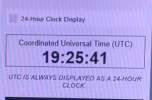
I (in a BST time zone currently) recorded the UTC clock from time.gov on my phone an Android Pixel 7 Pro for 54 seconds and then downloaded the file from photos.google.com

The 1st frame is this
1791448317353.png


The last frame is this

1791448036403.png


The resultant file name is

PXL_20261007_192542364.TS

So the filename contains the (approx) start time

But not only is the time stamps in the metadata for the end of the video it's actually 2 seconds past the time shown on the screen

exiftool -k output: (GPS removed)

File Size : 151 MB
Zone Identifier : Exists
File Modification Date/Time : 2026:10:08 09:19:11+01:00
File Access Date/Time : 2026:10:08 09:19:32+01:00
File Creation Date/Time : 2026:10:08 09:19:06+01:00
File Permissions : -rw-rw-rw-
File Type : MP4
File Type Extension : mp4
MIME Type : video/mp4
Major Brand : MP4 Base Media v1 [IS0 14496-12:2003]
Minor Version : 2.0.0
Compatible Brands : isom, iso2, mp41
Media Data Size : 150717631
Media Data Offset : 44
Movie Header Version : 0
Create Date : 2026:10:07 19:26:37
Modify Date : 2026:10:07 19:26:37
Time Scale : 10000
Duration : 0:00:54
Preferred Rate : 1
Preferred Volume : 100.00%
Preview Time : 0 s
Preview Duration : 0 s
Poster Time : 0 s
Selection Time : 0 s
Selection Duration : 0 s
Current Time : 0 s
Next Track ID : 5
GPS Coordinates :
Android Capture FPS : 30
Android Model : Pixel 7 Pro
Android Make : Google
Track Header Version : 0
Track Create Date : 2026:10:07 19:26:37
Track Modify Date : 2026:10:07 19:26:37
Track ID : 1
Track Duration : 0:00:54
Track Layer : 0
Track Volume : 0.00%
Image Width : 1920
Image Height : 1080
Graphics Mode : srcCopy
Op Color : 0 0 0
Compressor ID : avc1
Source Image Width : 1920
Source Image Height : 1080
X Resolution : 72
Y Resolution : 72
Bit Depth : 24
Pixel Aspect Ratio : 65536:65536
Color Profiles : nclx
Color Primaries : BT.709
Transfer Characteristics : BT.709
Matrix Coefficients : BT.709
Video Full Range Flag : Full
Video Frame Rate : 30.013
Balance : 0
Audio Format : mp4a
Audio Channels : 2
Audio Bits Per Sample : 16
Audio Sample Rate : 48000
Warning : [minor] The ExtractEmbedded option may find more tags in the media data
Matrix Structure : 0 1 0 -1 0 0 0 0 1
Media Header Version : 0
Media Create Date : 2026:10:07 19:26:37
Media Modify Date : 2026:10:07 19:26:37
Media Time Scale : 90000
Media Duration : 0 s
Handler Type : NRT Metadata
Handler Description : MetaHandle
Meta Format : mett
Meta Type : application/microvideo-image-meta
Image Size : 1920x1080
Megapixels : 2.1
Avg Bitrate : 22.4 Mbps
GPS Latitude :
GPS Longitude :
Rotation : 90
GPS Position :

PS C:\Users\xx\Downloads> .\exiftool.exe -time:all -G1 -a -s -api QuickTimeUTC=1 .\PXL_20261007_192542364.TS.mp4
[System] FileModifyDate : 2026:10:08 09:19:11+01:00
[System] FileAccessDate : 2026:10:08 09:31:41+01:00
[System] FileCreateDate : 2026:10:08 09:19:06+01:00
[QuickTime] CreateDate : 2026:10:07 20:26:37+01:00
[QuickTime] ModifyDate : 2026:10:07 20:26:37+01:00
[Track1] TrackCreateDate : 2026:10:07 20:26:37+01:00
[Track1] TrackModifyDate : 2026:10:07 20:26:37+01:00
[Track1] MediaCreateDate : 2026:10:07 20:26:37+01:00
[Track1] MediaModifyDate : 2026:10:07 20:26:37+01:00
[Track2] TrackCreateDate : 2026:10:07 20:26:37+01:00
[Track2] TrackModifyDate : 2026:10:07 20:26:37+01:00
[Track2] MediaCreateDate : 2026:10:07 20:26:37+01:00
[Track2] MediaModifyDate : 2026:10:07 20:26:37+01:00
[Track3] TrackCreateDate : 2026:10:07 20:26:37+01:00
[Track3] TrackModifyDate : 2026:10:07 20:26:37+01:00
[Track3] MediaCreateDate : 2026:10:07 20:26:37+01:00
[Track3] MediaModifyDate : 2026:10:07 20:26:37+01:00
[Track4] TrackCreateDate : 2026:10:07 20:26:37+01:00
[Track4] TrackModifyDate : 2026:10:07 20:26:37+01:00
[Track4] MediaCreateDate : 2026:10:07 20:26:37+01:00
[Track4] MediaModifyDate : 2026:10:07 20:26:37+01:00
 

Attachments

  • 1791448511524.png
    1791448511524.png
    205 KB · Views: 1
Last edited:
I would post it but it contains my GPS location and removing it affects the metadata which I assume you want to check unmolested I can email it to you.

edit its also too big for here, so I have emailed a gdrive link to you
 
Last edited:
I should also point out that often newer mobile phone videos don't work directly in sitrec, this is mostly from trying to solve cases posted on the Reddit sightings page where the original file with slightly altered metadata is presented.

The files are often too large for Sitrec and sometimes it seems Sitrec cannot decode the format, iPhone HDR videos etc (I'll try to dig out some examples)

So to get them in Sitrec I have to transcode them in handbrake
 
Back
Top