
New Feature Star Tracking - Figuring out where the camera is looking in the sky

New Feature

Mick West

Administrator
Staff member
Astrometry.net often works very well for finding where in the sky we are looking, but is not great with frames from videos that are noisy or contain other moving objects.

So I created a star tracker that attempts to resolve what lights in the scene are stars, and then figures out what the stars are, what the lens FOV and distortion is, and where we are looking in the sky, and then points the camera at those stars.
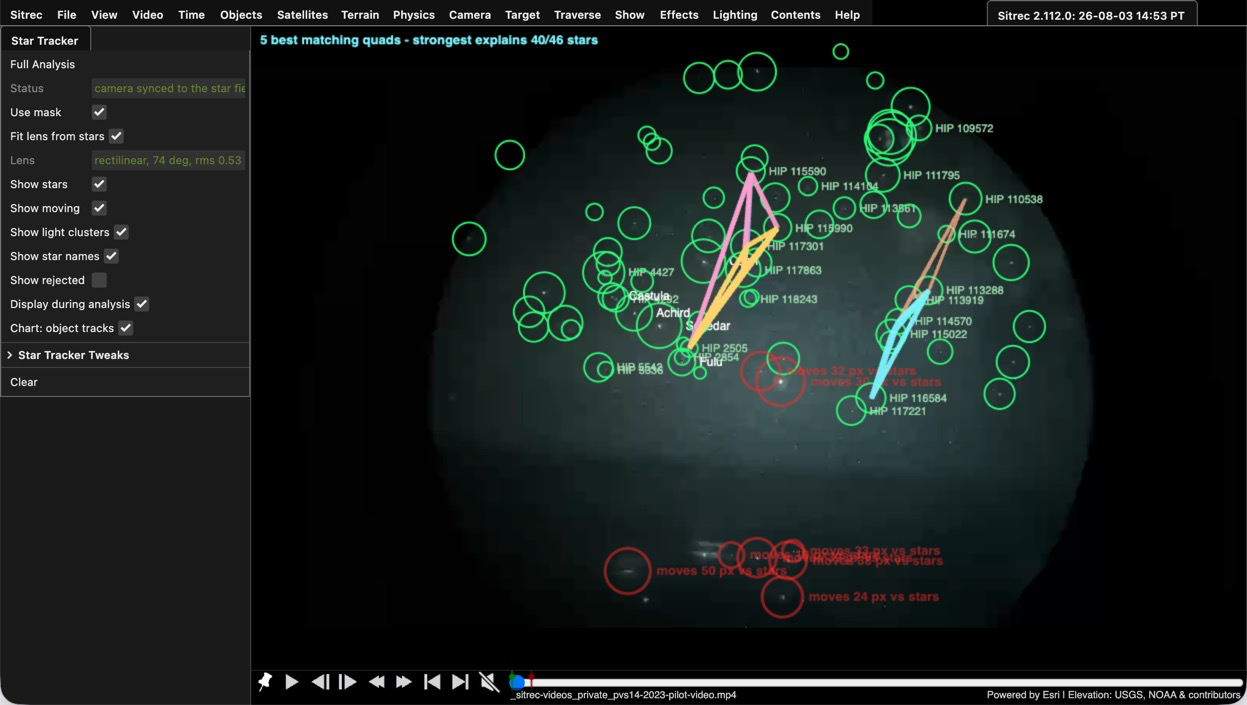
1785794355681.png


To use it Video/Star Tracker/ then "Full Analysis". If you get bad results due to stuff being in the way (like trees), then use Video/Masking to mask out the trees (Auto masking still in progress)

Full Analysis will point the camera at the stars. This works best if you already have the correct time and location, but you can also adjust those manually to find one that is possible.

More details: https://www.metabunk.org/sitrec/docs/StarTracker.html
 
Okay trying it out the star detection seems to work, but the camera sync is not working so well for me

I tried it with a classic the Pisonic Orbs in Utah, we already had a good star match and it was a fairly static camera so it seems a good basic test

And this is what it did, it seems to set the rotation and FOV wildly wrong in this case

https://www.metabunk.org/sitrec/?custom=11433/Bat full timelapse/20260225_093540.js

1785832929786.png
 
Last edited:
I tried this on a around 400 frames of the Park City UT video, but running it a couple of times on the same section gave different results. For example the first with Vega identified, and second with Achird visible. But, perhaps that video is too blurry to be useful?
Screenshot 2026-08-04 at 11.53.11.png
Screenshot 2026-08-04 at 11.54.58.png
 
I tried it with a classic the Pisonic Orbs in Utah, we already had a good star match and it was a fairly static camera so it seems a good basic test

And this is what it did, it seems to set the rotation and FOV wildly wrong in this case

https://www.metabunk.org/sitrec/?custom=11433/Bat full timelapse/20260225_093540.js
What in/out frame range did you use? That video has some sudden camera jumps

I just tried it on 93-254 and it seemed to work:

https://www.metabunk.org/sitrec/?custom=11433/Bat full timelapse/20260225_093540.js

1785866964176.png
 
I tried this on a around 400 frames of the Park City UT video, but running it a couple of times on the same section gave different results. For example the first with Vega identified, and second with Achird visible. But, perhaps that video is too blurry to be useful?
Can you save the sitch with the exact range you used and post it here?
 
Can you save the sitch with the exact range you used and post it here?
I'd closed it since but just tried it again. https://www.metabunk.org/sitrec/?custom=18302/StarTrackerTest_1/20260804_203008.js
From frames 1235 to 1413 (20.23s-23.14s) - (I was curious what it would make of the five faint stars in a chevron shape).
It now gives the same result each time.
Screenshot 2026-08-04 at 21.30.33.png

but then when I adjust the end point to 31s and run it again (671 frames) it thinks the camera is looking at the different SE sky.
But again, without making any changes and running it again it gives the same result. So, I haven't been able to replicate the two different results from my previous post without making a change to the number of frames.
Screenshot 2026-08-04 at 21.38.03.png
 
Back
Top